SCOOTER’S EASY SEAS CLASSROOM
Slots, observations, and sessions
Record what you saw separately from the money and time you actually played.
CLICK A CONTROL TO LEARN ITS PURPOSE
Slots, observations, and sessions
Practice guide · these buttons explain the app without changing your records.
1 / 8
A meter reading is an observation. It is not proof that a machine will pay or that an earlier win will repeat.
TRY THIS IN EASY SEAS
Your next three steps
- Select the correct ship and machine.
- Record the visible state and time.
- Save actual session data separately from the condition note.
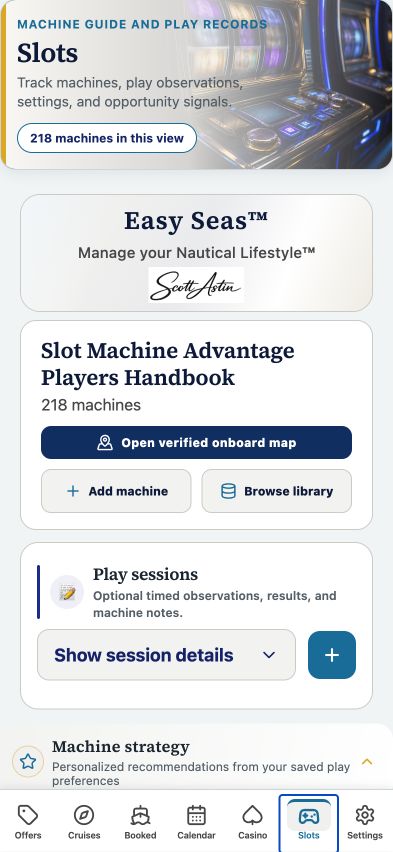
Your account may need sign-in first. The screenshot above is the matching tab view used for this lesson; the records and counts shown are illustrative visual evidence and can differ with your account.
THE COMPLETE LESSON REFERENCE
Every control in this lesson
- Open full Slots guide
- Open machine tools and play sessions.
- Open onboard mode
- Use the onboard casino workspace.
- Open verified machine map
- Inspect the available verified machine atlas.
- Add machine observation
- Record ship, location, machine, denomination, condition, and notes.
- Played / Passed / Watched
- Describe your observation decision rather than treating it as a prediction.
- Record session
- Record date, cruise, duration, points, and actual result when known.
- Deck plan
- Use stored ship location information when available.
- Machine reports
- Keep reported conditions separate from verified inventory and your own observations.
Reference checked against the current app source · October 3, 2026. Provider availability, permissions, and device capabilities can change which tools appear.