SCOOTER’S EASY SEAS CLASSROOM
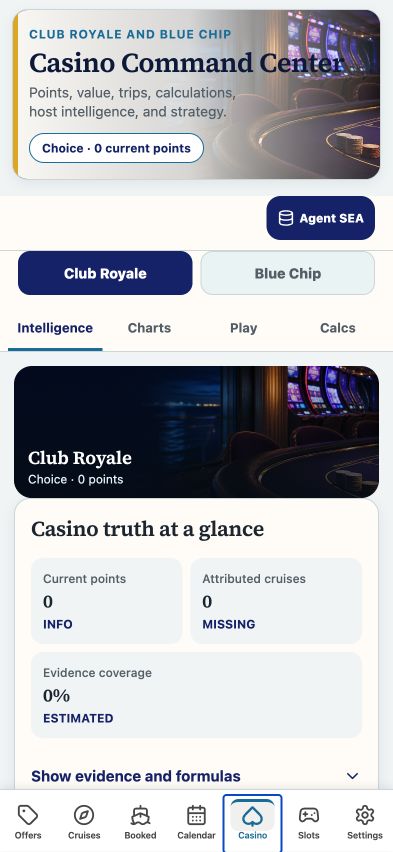
Casino · evidence before totals
Read portfolio results, charts, sessions, ship intelligence, calculations, and slots.
CLICK A CONTROL TO LEARN ITS PURPOSE
Casino · evidence before totals
Practice guide · these buttons explain the app without changing your records.
1 / 14
Coin-in measures wagering volume. It does not tell you how much money you brought or lost.
TRY THIS IN EASY SEAS
Your next three steps
- Scope the portfolio to the traveler and dates you need.
- Inspect evidence and the cruises included in the total.
- Open the Casino formulas lesson to interpret amounts, percentages, and multiples.
Your account may need sign-in first. The screenshot above is the matching tab view used for this lesson; the records and counts shown are illustrative visual evidence and can differ with your account.
THE COMPLETE LESSON REFERENCE
Every control in this lesson
- Intelligence
- Read the scoped cruise portfolio and its underlying evidence.
- Charts
- See visual trends in the saved data.
- Session
- Inspect recorded sessions and generated historical estimates.
- Ship
- Open ship performance, machine reports, onboard mode, and scenario tools.
- Calcs
- Inspect derived metrics and the assumptions behind them.
- Slots
- Open machine observations and the full Slots guide.
- Host Brief
- Prepare a summary for a host conversation.
- Comp Pace
- Open progress and pace planning.
- Relationship
- Open the casino relationship view.
- Closeout
- Reconcile a completed cruise’s records.
- Host CRM
- Maintain casino host relationship notes.
- Benefits
- Open the loyalty benefits calendar.
- Export
- Download the scoped casino portfolio.
- Historical session generation
- Build estimates from historical cruise totals. Generated records are not observed play sessions.
Reference checked against the current app source · October 3, 2026. Provider availability, permissions, and device capabilities can change which tools appear.