SCOOTER’S EASY SEAS CLASSROOM
Explore · find a sailing
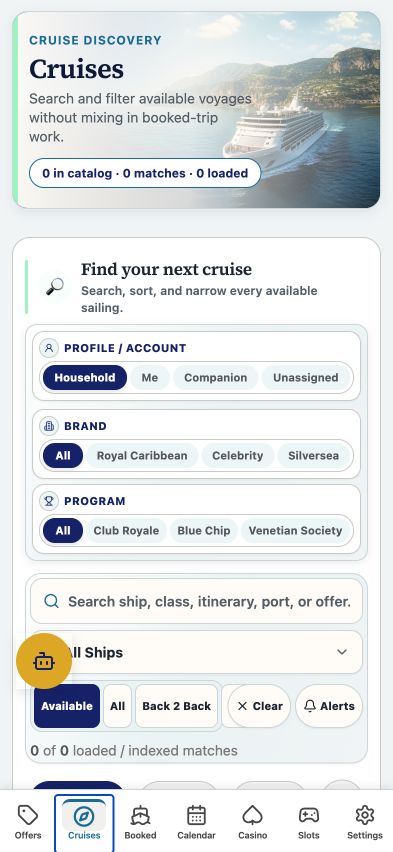
Search cruises, choose cabin and ship filters, and inspect back-to-back options.
CLICK A CONTROL TO LEARN ITS PURPOSE
Explore · find a sailing
Practice guide · these buttons explain the app without changing your records.
1 / 12
A matching sailing is a planning candidate. Confirm cabin availability and the exact offer terms before booking.
TRY THIS IN EASY SEAS
Your next three steps
- Choose dates and a departure port.
- Compare the same cabin and guest count across offers.
- Open a sailing and check conflicts against My Voyages.
Your account may need sign-in first. The screenshot above is the matching tab view used for this lesson; the records and counts shown are illustrative visual evidence and can differ with your account.
THE COMPLETE LESSON REFERENCE
Every control in this lesson
- Available
- Show eligible upcoming cruise options under the current filters.
- All
- Show the broader imported cruise inventory.
- Back 2 Back
- Inspect possible consecutive sailings and their dates and gaps.
- Booked
- Scope the cruise list to saved bookings.
- Search
- Search the cruise inventory using ship, itinerary, or sailing details.
- Ships / ship classes
- Select the vessels or ship classes you want to see.
- Interior / Ocean / Balcony / Suite
- Choose the cabin category to compare.
- Guests
- Match the number of travelers to the offer entitlement.
- Departure port / Region
- Narrow where your voyage starts or travels.
- Date / Nights
- Set date boundaries and trip length.
- Active filter chips
- Remove one selected constraint without clearing the others.
- Cruise card
- Open the sailing detail, attached offers, itinerary, and planning context.
Reference checked against the current app source · October 3, 2026. Provider availability, permissions, and device capabilities can change which tools appear.