SCOOTER’S EASY SEAS CLASSROOM
Calendar · every date has a job
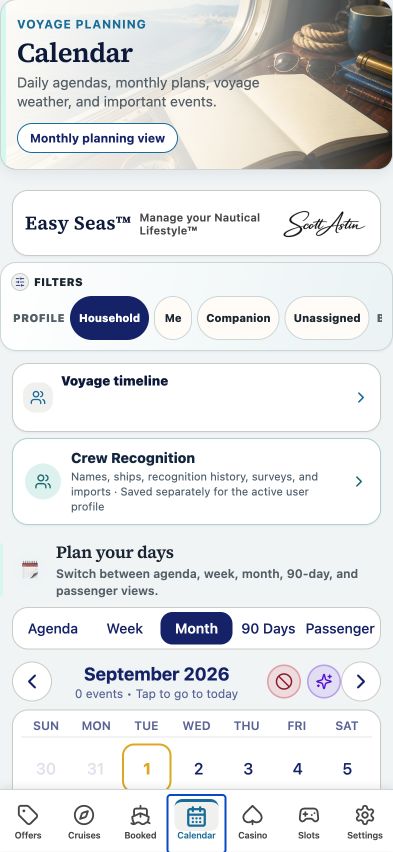
Read agendas, voyage days, reminders, expirations, and travel gaps.
CLICK A CONTROL TO LEARN ITS PURPOSE
Calendar · every date has a job
Practice guide · these buttons explain the app without changing your records.
1 / 11
Put the deadline on the calendar separately from the sailing. A reminder is only useful when it refers to the right date.
TRY THIS IN EASY SEAS
Your next three steps
- Switch between Month and Agenda.
- Open an expiration event and verify the source offer.
- Use Passenger to spot travel gaps between sailings.
Your account may need sign-in first. The screenshot above is the matching tab view used for this lesson; the records and counts shown are illustrative visual evidence and can differ with your account.
THE COMPLETE LESSON REFERENCE
Every control in this lesson
- Agenda
- Read events in chronological order.
- Week
- Read the selected seven-day window.
- Month
- See cruises and events in a monthly grid.
- 90 Days
- Review upcoming events and expirations over the next planning window.
- Passenger
- Review sea days, port days, land days, gaps, and milestones.
- Previous / Next period
- Move through the selected calendar view.
- Today
- Return the calendar to the current date.
- Day / event
- Open details or the agenda for a selected date.
- Passenger timeline pages
- Move through the detailed passenger timeline.
- Monthly tarot cards / calendar events
- Switch the optional display; tarot is entertainment, not a predictor of casino results.
- Crew Recognition
- Open your crew registry and recognition history.
Reference checked against the current app source · October 3, 2026. Provider availability, permissions, and device capabilities can change which tools appear.