SCOOTER’S EASY SEAS CLASSROOM
Settings · connections and data
Find profiles, provider connections, imports, backups, privacy, and preferences.
CLICK A CONTROL TO LEARN ITS PURPOSE
Settings · connections and data
Practice guide · these buttons explain the app without changing your records.
1 / 18
Export a backup before a major import. Review changes before applying them, then read the records back.
TRY THIS IN EASY SEAS
Your next three steps
- Use search to find the required setting.
- Confirm the active traveler before syncing.
- Review imported changes, Apply, then verify counts and record details.
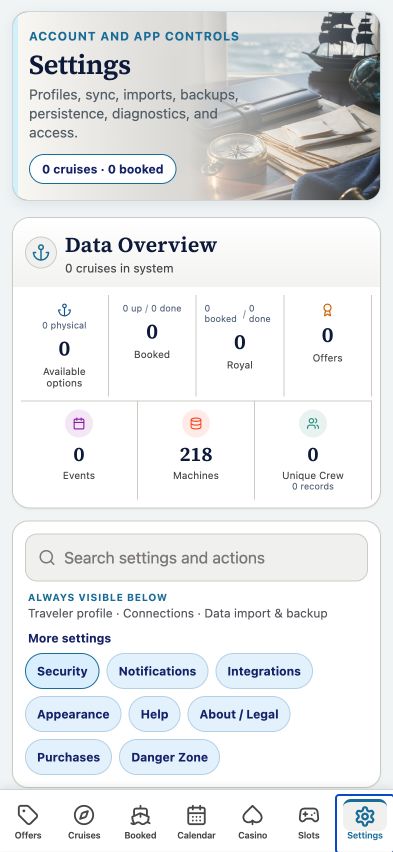
Your account may need sign-in first. The screenshot above is the matching tab view used for this lesson; the records and counts shown are illustrative visual evidence and can differ with your account.
THE COMPLETE LESSON REFERENCE
Every control in this lesson
- Search settings
- Search for a tool such as backup, sync, appearance, or privacy.
- Data Overview
- Read counts after local storage has restored and verified its records.
- Traveler profiles
- Open primary and second-traveler identity and loyalty controls.
- Cruise Deadline Reminders
- Configure check-in, payment, embarkation, offer, and certificate reminders.
- Sync Royal / Celebrity Casino
- Open provider connection tools for the selected traveler.
- Sync Carnival Cruises
- Open Carnival’s connection and import workflow.
- Sync Gmail
- Preview relevant owner messages and imports before applying.
- Sync to cloud
- Open the configured account sync workflow.
- Get all current pricing
- Request current verified pricing for saved sailings.
- Pricing summary and history
- Inspect recorded pricing evidence and past updates.
- Import
- Choose supported device files and review proposed changes.
- Calendar feed / Subscribe
- Open the subscription feed tools. Treat the feed URL as private.
- New URL
- Replace the calendar feed address; update calendars that used the old address.
- Full backup
- Export or recover the supported data bundle.
- Booked + Completed XLSX
- Export voyage fields as a spreadsheet.
- Device credential
- Manage the account’s device PIN enrollment.
- Appearance / privacy preferences
- Use available settings to adjust display and account choices.
- Admin
- Open protected tools only when your account has administrator access.
Reference checked against the current app source · October 3, 2026. Provider availability, permissions, and device capabilities can change which tools appear.